


Nerd AI - Tutor & Math Helper
4.62.30K Reviews
App Specs
- Version
- 4.0.7
- Updated On
- License
- Free
- Downloads
- 10,000,000+
- Developer
- Deep Flow Apps
- Categories
- Education
- Platform
- Android, iOS
Screenshots


 Analysis by AppCompare
If you've ever found yourself staring at a math problem wondering if it was written in some alien language, you're not alone. Math can be a tough nut to crack, but that's where Nerd AI - Tutor & Math Helper comes to the rescue. I recently got my hands on this app, and let me tell you, it's like having a math whiz in your pocket.
That pocket-helper idea is most useful when I treat the app as a study aid rather than an answer machine. I can bring it a question I do not understand, inspect the reasoning, and then try a similar problem myself. That small change in approach matters: copying a finished solution may get homework moving, but attempting the next step without help is what tells me whether I have learned anything.
Who benefits most from a worked example?
Nerd AI is a natural fit for learners who already have a problem in front of them and need a clearer route through it. A student reviewing algebra, someone refreshing arithmetic after time away from school, or a learner who gets stuck at one particular step can use that problem as a starting point. It is less suited to someone looking for a complete course plan, a teacher’s ongoing feedback, or a guaranteed explanation tailored to their class syllabus.
For a practical routine, I would first try the problem alone, then use a solution to identify the step where my reasoning went off track. After reading the explanation, I would close it and work the same question again from the beginning. If I can explain why each operation is valid, the app has helped; if I can only repeat the displayed sequence, I still need practice. This makes its explanations more valuable than simply checking whether a final answer matches.
Getting Started with Nerd AI
First things first, downloading and setting up Nerd AI - Tutor & Math Helper is a breeze. Available for both Android and iOS, you’re just a few taps away from having access to a world of math solutions. Once installed, the app prompts you to either create an account or log in with an existing one. Easy-peasy, right?
The user interface is clean and intuitive, which is a big plus. You don’t need to be a tech genius to navigate through the options. It’s all laid out in a way that even my grandma could figure it out, and she still struggles with her smartphone!
Readability, navigation, and a useful first step
For a learner who is anxious about getting started, a direct route from a question to an explanation can feel less intimidating than searching through a large lesson library. I would keep the first session narrow: enter one problem, read through the result, and note the point that was confusing. That gives the app a clear job and avoids turning a short study break into aimless browsing.
Worth Reading Before You Choose

EA SPORTS FC Mobile 26 Is a Bigger Football Game, but It Takes Time

Flipboard Shows What News Apps Must Do Beyond the Feed

Switching to Android Auto Means Rethinking Your Driving Routine

Google Calendar Makes a Crowded Week Easier to Manage

Ludo King Makes the Most of the Minutes Between Plans

Baby Panda World Brings Quick Play to Modern Phones, but Its Game Library Feels Busy
Deep Flow Apps is the developer behind this free education app. It has a 4.6 average from around 392,000 ratings and over 10 million installs, which suggests that many learners have tried it, though popularity alone cannot tell me whether an explanation fits a particular student’s needs. The app is rated for Everyone, runs on Android 7.0 or later, and its current version is 4.0.4. Optional in-app purchases range from $0.49 to $59.99 per item, so I would check the purchase details before choosing anything beyond the free use. It was released on July 18, 2023.
The Magic of Step-by-Step Solutions
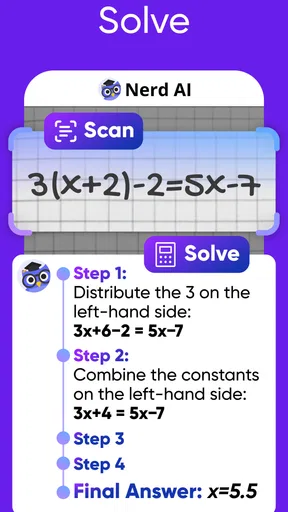
One of the features that really stood out to me is the step-by-step solution guide. You can either type in your math problem or use the camera feature to snap a picture of it. The app then works its magic, breaking down the problem into manageable chunks. It’s like having a teacher explain each step in detail, ensuring you understand the ‘why’ and ‘how’ of the solution.
The step-by-step solutions are an absolute game changer. It’s not just about getting the right answer; it’s about understanding the process.
The choice between typing and taking a picture is more than a convenience. Typing gives me a chance to check that I have represented symbols and parentheses correctly, while a photo can be faster when the question is printed or handwritten. With either method, I would inspect the problem as entered before trusting the result: a misread exponent or minus sign can send an otherwise sensible explanation in the wrong direction. For a multi-part exercise, I would also handle one part at a time so it is easier to see which step needs attention.
Interactive Learning Experience
What’s even cooler is the interactive component of the app. It’s not just about spoon-feeding solutions; Nerd AI encourages learning through interactive quizzes and challenges. This not only makes learning fun but also helps reinforce the concepts you’ve just learned. It’s like a math game that actually makes you smarter!
The app covers a wide range of topics, from basic arithmetic to more complex subjects like calculus and statistics. So whether you’re a student trying to ace your exams or just someone who wants to brush up on your math skills, there’s something here for everyone.
A realistic study session, and how it compares
Imagine I have ten minutes before class and cannot see why my statistics exercise uses a particular operation. I can enter the question, follow the explanation, then try a fresh example from my notes without looking at the answer. If I still cannot explain the choice of method, I have a specific question to take to a teacher or classmate. That is a better use of a short session than rushing through several solved problems and mistaking recognition for understanding.
Compared with a standard calculator, this app is aimed at explaining a route through a problem, not merely producing a numerical result. Compared with a textbook, it can start from the exact question that has me stuck rather than asking me to locate a matching lesson first. A human tutor remains the stronger choice when I need someone to notice confusion, ask follow-up questions, or adapt an explanation to my course. I see the app as a bridge between those options: convenient for independent practice, but not a replacement for instruction when the underlying idea still feels unclear.
Additional Features Worth Mentioning
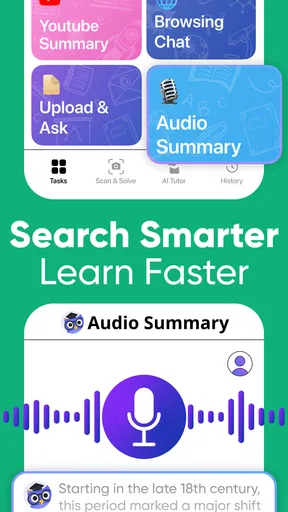
Besides the core functionalities, Nerd AI offers a few noteworthy extras that really enhance the user experience. There’s a handy calculator for quick calculations, and the app also provides detailed explanations for each solution. Plus, you can bookmark problems to revisit them later, which is super convenient.
Bookmarks can do more than save a question I liked. I would use them to collect problems that exposed different kinds of mistakes, then revisit the set before a quiz and attempt each one without opening its explanation right away. That turns saved items into a small personal review queue. It is also a useful way to separate “I got the answer” from “I can solve this again later,” which is the more meaningful test of progress.
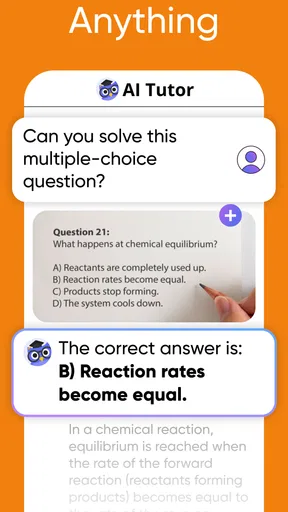
Another feature that caught my attention is the ability to connect with a live tutor. This is perfect for those moments when you need a bit more help than the app can provide. It’s like having a personal tutor on standby, ready to assist whenever you’re stuck.
Using it across different abilities and situations
For readability, I value a layout that does not demand technical confidence before I can reach the learning task. The simple navigation described above should help people who prefer a direct interface, but the quality of a math explanation still depends on the learner being able to read symbols, follow notation, and distinguish one step from another. If dense equations are difficult to see or process, I would test a short problem first and judge whether the presentation works comfortably before relying on it for a long study session.
Typing can be a useful alternative when taking a picture is awkward, while the camera route may reduce the effort of entering a long expression. Neither input method is automatically easier for every person: typing symbols can be demanding, and a photo can be challenging when the writing is faint, crowded, or poorly framed. A practical workaround is to simplify the task where possible: enter a shorter expression, check the captured problem carefully, and split a long question into smaller parts. I would not assume that a particular accessibility setting or specialized control is available without checking the app on my own device.
Context matters too. A quiet desk is the easiest place to read a sequence of steps and reflect on it. On a bus or between classes, I might use a brief session to check one point, but movement, glare, noise, and limited time can make careful study harder. If I need to concentrate on a difficult concept, I would save the question and return to it somewhere calmer instead of trying to absorb a full explanation in a distracting moment.
Where I would be cautious
An AI-generated answer should be treated as something to examine, not as unquestionable authority. I would compare unfamiliar methods with class notes or a trusted teacher, especially when the wording of a question is ambiguous or the result does not make sense. In math, one small input error can change the whole problem, and a confident-looking sequence is not proof that I entered the question correctly. The app is most useful when I stay involved and ask whether each step follows from the one before it.
There are also practical limits to what a helper can do. It may show a route to an answer, but it cannot know what a particular teacher expects unless I provide that context, and it cannot replace sustained practice. Learners who need a structured curriculum, detailed feedback on their written work, or an instructor who can spot a misconception through conversation may be better served by a class, textbook, or human tutor. Free to download does not mean every optional feature is free: in-app purchases are offered, so I would review the terms shown in the app before making a purchase.
Final Thoughts
All in all, Nerd AI - Tutor & Math Helper is a must-have for anyone looking to improve their math skills. It’s user-friendly, incredibly helpful, and offers a comprehensive learning experience. Whether you’re tackling algebraic equations or diving into the depths of calculus, this app has got your back.
So, if you’re ready to conquer your math fears and turn those tricky problems into a walk in the park, give Nerd AI a try. You might just find yourself enjoying math more than you ever thought possible!
My inclusive verdict
I would recommend this app to learners who want a low-friction way to investigate a specific math question, especially those who benefit from seeing a worked route before trying again on their own. Its mix of typed and camera input, explanations, quizzes, calculator, saved problems, and access to a live tutor gives different learners several ways to approach a sticking point. The best results come from using those tools actively rather than letting the app do all the thinking.
I would hesitate to recommend it as the only learning resource for someone who needs a carefully paced course, extensive personal feedback, or a presentation style that has not yet proved comfortable for them. Try a short, representative problem first; see whether the input and explanation suit your needs; then decide whether it deserves a place in your routine. For independent practice and quick clarification, I find it a helpful companion, while a teacher, textbook, or dedicated course remains the better choice when learning requires more structure or personal adaptation.
Pros
- Offers detailed step-by-step solutions.
- Supports a wide range of math topics.
- User-friendly interface for easy navigation.
- Real-time assistance with AI-powered tutor.
- Offline access to saved solutions.
Cons
- Some advanced features require payment.
- Limited support for non-math subjects.
- Occasional inaccuracies in complex problems.
- May consume significant device storage.
- Requires stable internet for live tutoring.
FAQs for Nerd AI - Tutor & Math Helper
What is Nerd AI - Tutor & Math Helper?
Nerd AI - Tutor & Math Helper is an innovative app designed to assist students with a variety of math topics. It offers step-by-step solutions, interactive tutorials, and personalized learning experiences. The app supports a wide range of subjects, from basic arithmetic to advanced calculus, making it a comprehensive tool for learners of all levels.
How does the app provide math help?
The app uses advanced AI algorithms to analyze and solve math problems. Users can input problems manually or use the camera feature to scan handwritten equations. Nerd AI then breaks down solutions into understandable steps, offering explanations and tips to enhance comprehension, ensuring that users not only find answers but also learn the concepts.
Is Nerd AI suitable for all age groups?
Yes, Nerd AI is designed to be versatile, catering to students from elementary school to college. The app's interface is user-friendly, with content tailored to different educational levels. It adjusts difficulty based on user feedback and performance, ensuring that learners of all ages find it beneficial and engaging.
Does Nerd AI require an internet connection?
While many features of Nerd AI can be used offline, such as basic problem-solving and previously downloaded tutorials, certain functionalities like real-time updates, new content, and cloud-based storage require an internet connection. An online environment enhances the app's capabilities, ensuring access to the latest resources and collaborative features.
Are there any in-app purchases or subscription fees?
Nerd AI offers a free version with basic features, but advanced functionalities and additional content may require in-app purchases or a subscription. This model allows users to access premium tutorials, personalized coaching sessions, and more. It's advisable to review the pricing structure within the app to understand what is included in your download.


